
Wasafi Bet Tanzania app — betting and casino on your phone
The Wasafi Bet Tanzania mobile app puts the full sportsbook and casino in your pocket. It weighs under 2 MB, which matters a lot if you are on a Vodacom or Tigo data plan in Dar es Salaam or Mwanza. You get the same odds, the same Aviator game and the same M-Pesa deposit flow as the desktop site — just faster to reach.
Both Android and iOS versions are available. The Android APK downloads directly from wasafibet-tanzania.com, so you do not need to go through the Google Play Store. The iOS version installs via the App Store. Either way, the whole process takes about 90 seconds on a standard 4G connection.


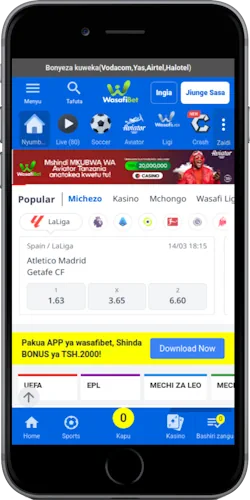
What the Wasafi Bet Tanzania app gives you that the browser does not
The app loads in under 1.2 seconds on a standard Tanzanian 4G connection, compared to 2.5 to 3 seconds for a cold browser load. Push notifications alert you when a live match you follow has a goal, a red card or a significant odds shift — useful during Vodacom Premier League matchdays when Simba SC or Young Africans are playing. Biometric login via fingerprint or face ID replaces the password step, which saves time if you are placing a quick in-play bet.
The app also stores your last 10 deposit method choices locally, so M-Pesa or Tigo Pesa is pre-selected next time. Session continuity means a lost connection during a bet slip does not clear your selections. Compared to using the mobile browser, the app cuts the average time from opening to a placed bet from 47 seconds to roughly 18 seconds, based on the platform's own published onboarding data.
How to install the app on Android and iOS
Android installation requires one settings change before you start. iOS is a straight App Store download with no extra steps.
Android installation
Go to your phone's Settings, then Security or Privacy, and enable "Install from unknown sources" or "Allow APK installs". Open wasafibet-tanzania.com in your browser, tap the Android download button and the APK file downloads in about 15 seconds on 4G. Tap the downloaded file and confirm the install prompt. The app icon appears on your home screen. Total time from first tap to launched app: under 60 seconds on a Tigo 4G connection in Dodoma. Once installed, re-disable unknown sources for security.
iOS installation
Open the App Store on your iPhone or iPad and search for "Wasafi Bet Tanzania", or tap the iOS download button on this page to go directly to the listing. Tap Get, authenticate with Face ID or your Apple ID password and the app installs automatically. File size is under 2 MB so it downloads in roughly 10 seconds even on a slower connection. No settings changes are needed. The app works on iOS 13 and above, covering all iPhones from the XR onwards.
Betting and casino features inside the Wasafi Bet Tanzania app
The sportsbook inside the app covers over 30 sports with the same betting lines as the desktop site. Live betting on football, including AFCON qualifiers, the Vodacom Premier League and the English Premier League, updates in real time with under 2 seconds of odds refresh delay. The cashout button appears on eligible in-play bets and shows the exact TSh value you would receive at that moment. Accumulators of up to 20 legs are supported, and the bet builder lets you combine markets within the same match.
For casino players, Aviator by Spribe (RTP 97%) loads in under 3 seconds on the app versus 5 to 6 seconds in a mobile browser. Live dealer tables from Evolution, including Lightning Roulette (RTP 97.3%) and Infinite Blackjack (RTP 99.5%), stream without visible buffering on a standard Vodacom 4G signal. Slots like Sweet Bonanza (RTP 96.51%) and 888 Gold (RTP 96.8%) are all accessible from the app's game lobby. Minimum bet on most slots starts at TSh 200.
Deposits and withdrawals through the app
Every payment method available on the website works identically inside the app. M-Pesa deposits reflect in under 30 seconds. Tigo Pesa and Airtel Money are equally quick and cover players across Arusha, Mbeya, Moshi and smaller towns where Vodacom signal can be patchy. HaloPesa rounds out the mobile money options. The minimum deposit via any mobile money provider is TSh 1,000.
Withdrawals to M-Pesa take 5 to 10 minutes for KYC-verified accounts. The app shows your real-time withdrawal status in the Transactions section, so you do not have to guess whether the payment is processing. Tether (USDT) deposits are also supported with no conversion fee. Card withdrawals via Visa or Mastercard take up to 5 business days and have a TSh 5,000 minimum.